🥞 stackrun 🏃
stackrun is a process-orchestration CLI. It is an alternative to running a local stack with concurrently, npm-run-all2, Wireit, or native shell operators (&, wait, &&).
Those tools stay inside npm scripts or a single shell. stackrun is a standalone binary: any language, prefixed logs, before / after hooks, and optional Cloudflare tunnels.
Tunnels are built for local authentication as much as for sharing a stack. OAuth, OIDC, and SSO providers redirect the browser only to callback URLs you registered — exact scheme, host, and path. Many reject http://localhost, require HTTPS, or cannot reach a process that exists only on loopback. A named tunnel (public) gives the local web or API a stable https://… host that matches the dashboard entry, so login completes against the processes on your laptop. You keep one callback URL instead of deploying to test auth, or re-registering a new *.trycloudflare.com host every run. Quick tunnels are fine for a one-off share; named hosts are what you want when the callback is fixed.
Commands are opaque processes. Python, Node, Go, shell, or any executable works. Node evaluates JS/TS config files and, in the npm package, shims stackrun / import { stackrun }.
Example
One stack: start a Docker DB, run api + web, expose web, tear the DB down.
Quick tunnel (no public). URL is a new https://<id>.trycloudflare.com each run, in the [tunnel-web] log. Needs cloudflared. No login.
# stack.config.yaml
before:
  # Sequential. Inherited stdio. A failed hook aborts — no commands, no tunnels.
  - docker compose up -d db
after:
  # Always runs after commands have exited (ok, fail, or Ctrl+C). Not skipped on failure.
  # Use this to tear down docker / temp files. A failed after hook still fails the run.
  - docker compose down db
commands:
  - name: api
    run: npm run dev
    cwd: ./api
    color: green
  - name: web
    run: npm run dev
    cwd: ./web
    color: blue
    tunnel:
      local: http://127.0.0.1:3000
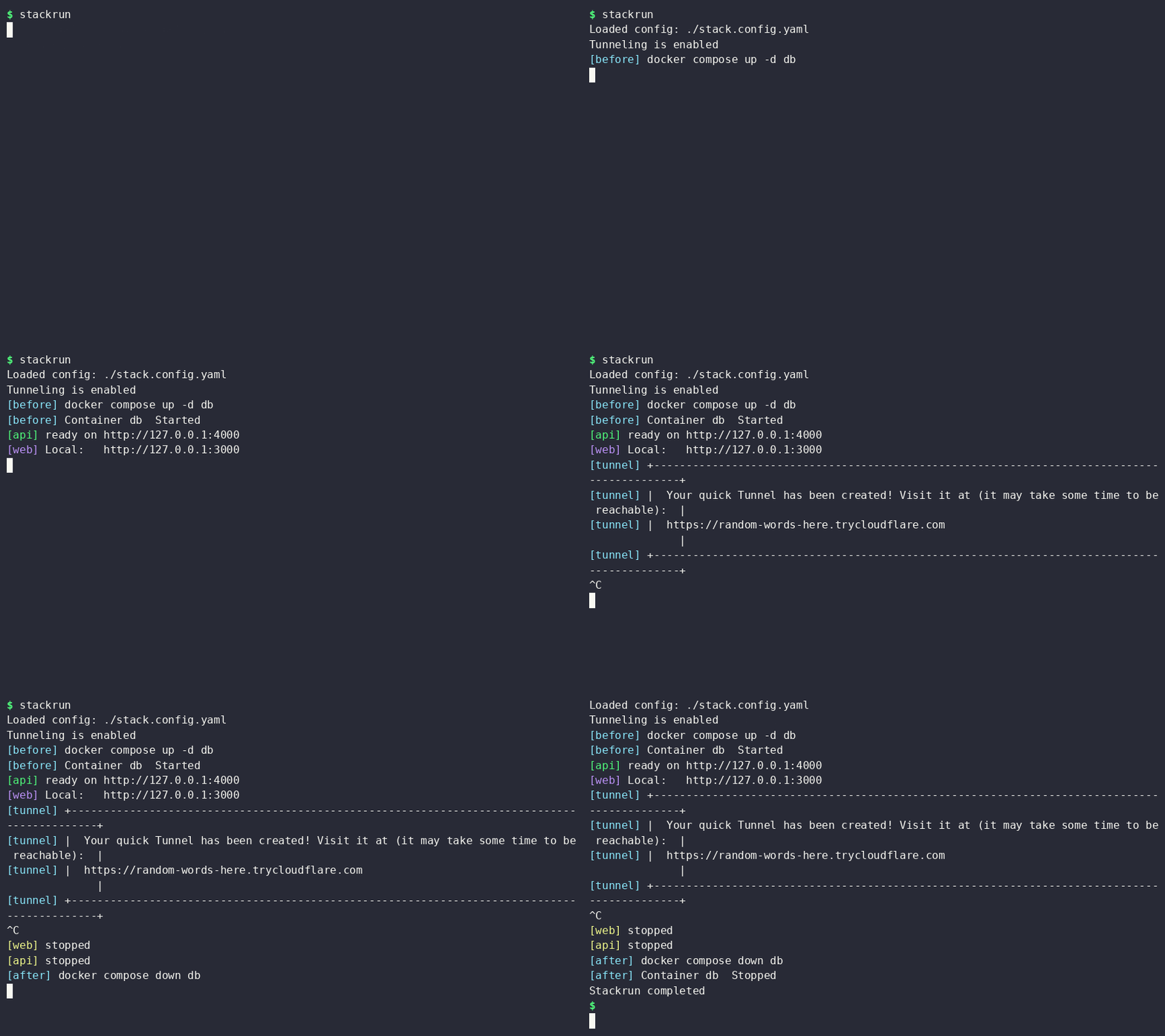
Named tunnel (add public). URL is exactly that hostname. Needs cloudflared tunnel login and the name on your zone.
    tunnel:
      local: http://127.0.0.1:3000
      public: https://web.example.dev
- Omit
public→ quick → new*.trycloudflare.comeach run. - Set
public→ named → URL ispublic. - No
tunnelkey → no cloudflared, no public URL.
killOthers: failure (default) kills siblings when one command exits non-zero. It does not control after. after always runs once commands have exited, unless before failed or the run never started.
Put the file in the project root and run stackrun. See Quick start for CLI flags.
Features
- One config file for a local stack
- Concurrent processes with
[name]prefixes (color on the name only); stackrun-owned lines use[stackrun]the same way - Ctrl+C stops every command, then runs
after, then exits 0 unless a command already failed - JSON, JSONC, JSON5, YAML, TOML,
.env, and.stackrc - Optional JS/TS config (
nodeplus localjiti, or--jiti npx) - Lifecycle hooks (
before/after) - Per-command
env,cwd, andtunnel.env --dry-runprints the loaded config as JSON- Per-command Cloudflare tunnels: quick (
*.trycloudflare.com) or named (your zone) — named hosts fit OAuth/OIDC callback URLs that must match a registered HTTPS origin
Requirements
Unix is the primary platform. On SIGINT, Stackrun stops each child process group. Windows uses cmd /c without that extra group handling.
cloudflared is needed only for tunnels. Omit tunnel on a command and stackrun does not look for it.
- macOS
- Windows
- Debian / Ubuntu
- RHEL / Fedora
- Arch
Homebrew:
brew install cloudflared
WinGet:
winget install Cloudflare.cloudflared
Cloudflare apt repo, then the package:
sudo mkdir -p --mode=0755 /usr/share/keyrings
curl -fsSL https://pkg.cloudflare.com/cloudflare-main.gpg | sudo tee /usr/share/keyrings/cloudflare-main.gpg >/dev/null
echo "deb [signed-by=/usr/share/keyrings/cloudflare-main.gpg] https://pkg.cloudflare.com/cloudflared any main" | sudo tee /etc/apt/sources.list.d/cloudflared.list
sudo apt-get update && sudo apt-get install cloudflared
Cloudflare yum repo, then the package:
curl -fsSl https://pkg.cloudflare.com/cloudflared.repo | sudo tee /etc/yum.repos.d/cloudflared.repo
sudo yum update && sudo yum install cloudflared
sudo pacman -Syu cloudflared
Other OS/arch (binaries, .deb, .rpm, Docker, Windows MSI): Cloudflare downloads or GitHub Releases.
Quick tunnels (tunnel.local only) need the binary. Named tunnels (public set) also need one login: cloudflared tunnel login. No API token.
Node is needed only for the npm package (npx, npm i, or import { stackrun }) or for JS/TS config files. YAML, TOML, and JSON need no Node.
A Rust toolchain is needed only when building from source.